
Banlatmayan CS2 Hilesi
Hile kullanan rakiplere, haksız rekabete ve yenilgiye katlanmak zorunda değilsiniz. Bolmax sizi ilk maçınızdan itibaren durdurulamaz hale getirir.
Kişiye özel dosyalarla sunulan legit oyun deneyimini tek bakışta değerlendirin.
Arkanızdaki gizli gücü kimse fark edemez. Şüphe çekmezsiniz.
Arkada hiçbir iz bırakmadan çalışır. Tespit yok. Risk yok.
Sistem size eşsiz bir dosya üretir. Dünyada başka hiçbir eşi yoktur.
Legit bir oyun deneyimi için ayarlanmış özellikleri keşfedin.


Sıradan hile yazılımları ve eski nesil yöntemler dosyalarınıza müdahale ederek sizi VAC Live dalgalarında açık hedef yapar. Bolmax Ghost™ teknolojisi, oyun içinde oyunun yapısına müdahale etmeden %100 görünmezlik sağlar. VAC risklerini geride bırakın.
Kriter | Onlar Diğer Yazılımlar | Biz Bolmax  |
|---|---|---|
Kriter Çalışma yöntemi | Onlar · Diğer Yazılımlar Dosya ve süreç teması | Biz · Bolmax Ghost™ teknolojisi |
Kriter Oyun dosyaları | Onlar · Diğer Yazılımlar Değiştirilir ve bozulur | Biz · Bolmax Müdahale yok |
Kriter Sistem izi | Onlar · Diğer Yazılımlar Okunabilir kalıntılar | Biz · Bolmax Sessiz oturum |
Kriter Ban dalgaları | Onlar · Diğer Yazılımlar İlk dalgada banlatır | Biz · Bolmax VAC Live öncelikli hesap güvenliği |
Kriter Teknik yük | Onlar · Diğer Yazılımlar Kullanıcıya karmaşa bırakır | Biz · Bolmax Legit ve sade arka plan akışı |
Kriter Kurulum | Onlar · Diğer Yazılımlar Uğraştıran kurulum süreçleri | Biz · Bolmax Kurulum yok |
Hesabınız için hazırlanan imzalı Bolmax dosyasını panelinizden güvenle indirin.
Dosyayı çalıştırın ve karmaşık kurulum adımlarına takılmadan hızlıca hazır olun.
Counter Strike 2'yi açın, Insert ile Menüye ulaşın; eski düzenden alışık olduğunuz özellikleri seçin.
Bolmax deneyimlerini kullanıcı yorumları üzerinden inceleyin.
Lokito
#629
"Yıllardır kullanıyorum gayet güzel kullanışlı ve emekle yapılmış bir uygulama çok memnunum"
Bababababa
#628
"yıllardır kullandığım bir hiledir halada ban yemedim 5 sene oldu.cidden başarılı bir hile"
Kocareis
#627
"Kac senedir aliyorum, ne ban ne de düşük faktör hiçbir şekilde bir şey olmadi. Kendileri gerçekten bu işi yapanlar arasında tek geçerim."
Necati Yurtaydın
#626
"Çok çok iyi uygulama, gerçekten güvenilir. Kesinlikle öneriyorum. Güven, kalite ve daha fazlası."
Unexcepted Peek
#625
"Harika bir hile 2 yıldır kullanıyorum çok memnunum. İyi ki sizi tanımışım."
Eren
#624
"Güzel program. Temiz, güvenilir ve deneme paketi olması da ekstra hoş. Teşekkürler Bolmax."
Kfc
#623
"Çok iyi bir hile denemelisiniz. Gerçekten söyleyecek bir şey bulamıyorum çünkü çok iyi."
Thelinc
#622
"Çok iyi! Fiyatları aşırı ucuz. Ban yemeden gönül rahatlığıyla oynayabilirsiniz."
Goodappletr
#621
"Gerçekten mükemmel çalışıyor. Parasının her kuruşunu hak ediyor ve ban kesinlikle yedirmiyor."
Zed
#620
"Aramadığım her şeyi bulduğum bir hile olmuş ve gerçekten güzel. Emeği geçen herkese teşekkürler."
En İyi CS2 Hilesi
Bolmax, nişan desteğinin yanı sıra oyuncu konumlarını görüntüleme ve yayın görünümünü düzenleme seçenekleri de sunar. Bolmax’in sunduğu rakiplerin konumunu görme ve nişan alma desteği gibi premium hile özellikleri, CS:GO konsol komutlarıyla yapılan oyun ayarlarından farklıdır. CSGO hile kullanımından Counter-Strike 2’ye geçerken, alışık olduğunuz premium özelliklerin CS2 hack yazılımındaki karşılıklarını aşağıdaki açıklamalarda inceleyebilirsiniz.
Bolmax’in oyun tarzınıza uygun özellikleriyle oynamaya başlayın. İhtiyaçlarınıza uygun bir paket seçmek için CS hile paketleri arasındaki nişan, görüş ve yayın seçeneklerini karşılaştırabilirsiniz. Karar verirken ihtiyaç duyduğunuz özelliklerin yanı sıra lisans süresini ve kullanım kolaylığını da göz önünde bulundurun. Özelliklerin nasıl çalıştığını görmek için bu bölümdeki YouTube tanıtım videosunu izleyebilir, aşağıdaki videolarda oyun içindeki kullanım örneklerini inceleyebilirsiniz.
Aimbot ve Triggerbot ile nişan desteği
Bolmax’ın özelliklerinden Aimbot (aim hilesi), otomatik nişan alma desteği sunarak nişangahınızı belirlenen görüş alanı içindeki hedefe yönlendirir. Görüş alanı, yani FOV, hedef seçiminin yapılacağı alanı ifade eder. Triggerbot ise nişangahınız rakibin üzerine geldiğinde ateşlemeyi tetikler. Böylece hedefe yönelme ve ateşleme işlevlerini ayrı ayrı değerlendirebilirsiniz. CS2 aimbot kullanımını ve Triggerbot ile arasındaki farkı demo görüntülerindeki örneklerden inceleyebilirsiniz.
Wallhack ve ESP ile oyuncu konumlarını görün
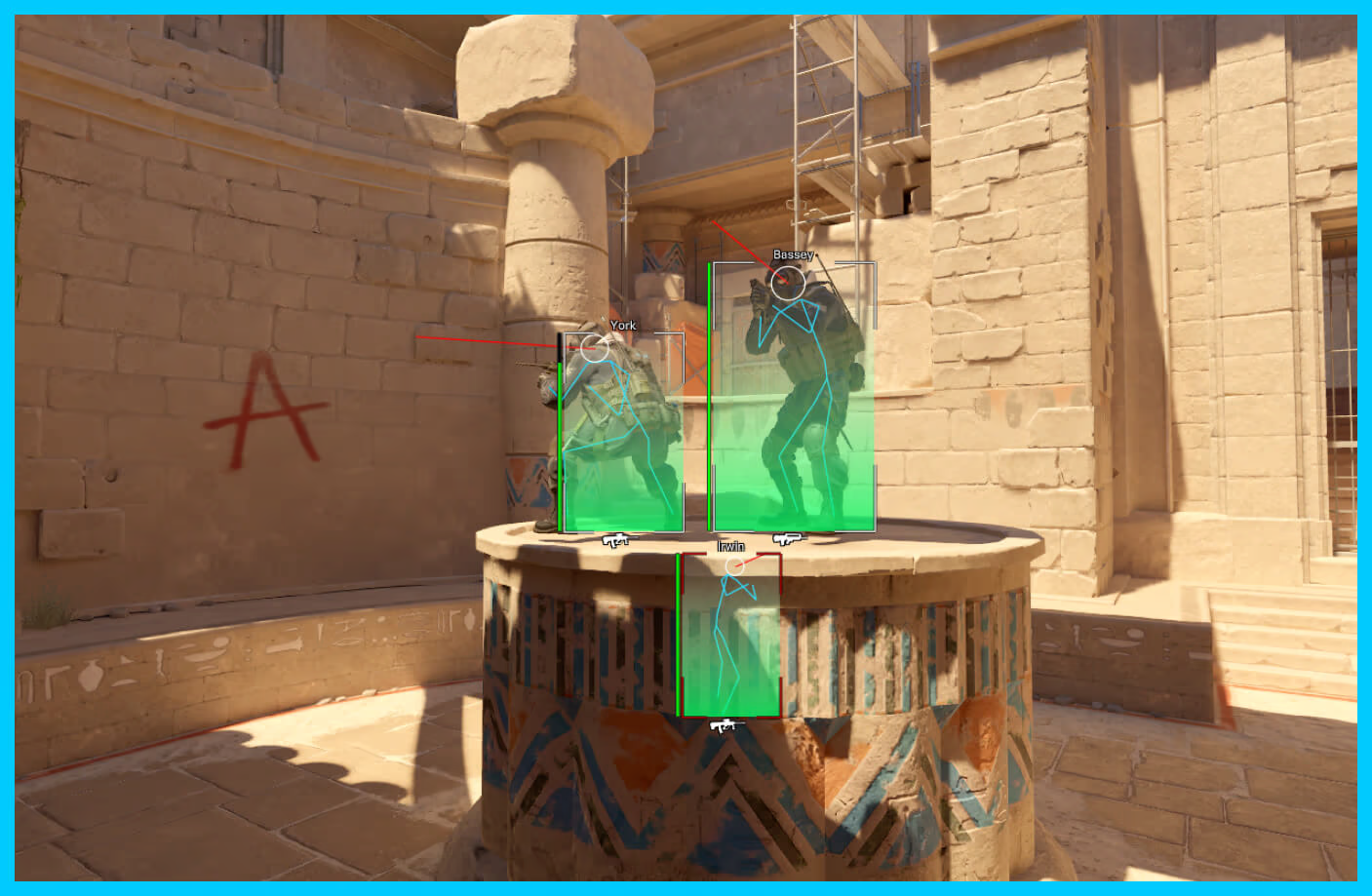
Bolmax’ın görüş seçenekleri, oyuncuların konumlarını ekranda gösterir. Görüş hilesi veya duvar arkası görme olarak bilinen bu özellikler CS2 wallhack adıyla da aranır. Box ESP rakiplerin etrafına kutular çizer; görünür ve duvar arkasındaki oyuncular için farklı renkler seçebilirsiniz. İskelet, vücut duruşunu çizgilerle gösterirken Kafa Kutusu başın konumunu işaretler. Göz Işını ise oyuncunun baktığı yönü takip etmenizi sağlar. Görüntüleri incelerken kutu, iskelet ve bakış yönü işaretlerinin hangi bilgiyi aktardığına dikkat edin. Aynı oyuncu üzerinde görünen bu öğeler birbirinin yerine geçmez; konum, duruş ve yön hakkında ayrı bilgiler sunar.
Radar ve mesafe bilgisiyle konum takibi
Radar, görüş alanınız dışında kalan rakiplerin konumlarını harita üzerinde görmenizi sağlar. Mesafe göstergesi oyuncuların size uzaklığını metre cinsinden belirtir. Çizgi özelliği, ekranın altından oyuncuya uzanan bir işaretle konumu takip etmeyi kolaylaştırır. Bu bilgiler, ekrandaki oyuncu işaretlerini konum ve uzaklık bilgisiyle tamamlar. Mini haritadaki konum ile ekrandaki mesafe değerini birlikte okuyabilirsiniz. Örneğin, bir işaretin yönü oyuncunun hangi tarafta olduğunu anlatırken metre bilgisi uzaklığını belirtir. Böylece radar ve ESP arasındaki bilgi farkını daha kolay değerlendirebilirsiniz.
Can, zırh ve ekipman bilgilerini takip edin
CS2 ESP seçenekleri yalnızca oyuncunun yerini göstermez. Can ve zırh göstergeleri oyuncunun durumunu, silah ve mermi göstergeleri ise ekipman bilgisini ekrana taşır. İsim göstergesi işaretlenen oyuncuyu tanımanıza yardımcı olur. Kafa Çizgisi de ekranın ortasındaki yatay çizgiyle nişangah yüksekliğinizi takip etmenizi sağlar.
OBS ve Discord için Yayında Gizle
Yayında Gizle, Bolmax göstergelerini OBS veya Discord üzerinden paylaştığınız yayın görüntüsünde gizlemek için kullanılır. Böylece kendi oyun ekranınızda gördüğünüz göstergeler ile izleyicilere aktarılan görüntüyü ayrı değerlendirebilirsiniz. Yayın öncesinde OBS önizlemesini veya Discord ekran paylaşımını kontrol edin. Kendi monitörünüzdeki görüntü ile karşı tarafa giden görüntüyü karşılaştırmak, yayın ayarlarınızı değerlendirmenizi sağlar. Oyun ekranınızdaki göstergelerin görünmesi, aynı öğelerin yayında da göründüğü anlamına gelmez.
Paketlerin özelliklerini karşılaştırın
Lite, Plus ve Pro paketleri farklı özellikler sunar. İhtiyaçlarınıza uygun bir paket seçerken yalnızca bir özellik adına bakmak yerine görüş ve nişan seçeneklerini karşılaştırın. Paket fiyatlarını ve lisans sürelerini fiyatlandırma sayfasında karşılaştırın; özelliklerin oyun içindeki görünümü için aşağıdaki videolara göz atın. Karşılaştırma tablosunda nişan desteği, oyuncu bilgileri ve yayın seçeneklerine bakarak ilerleyebilirsiniz. CS hile paketleri arasında karar vermeden önce ilgili açıklamaları ve demo görüntülerini de inceleyin. Uygun fiyat ararken yalnızca toplam ücreti değil, seçtiğiniz süreyi ve kullanacağınız özellikleri de dikkate alın.
Sık sorulan sorular
Bolmax hesabınızı oluşturun ve hesabınıza bakiye yükleyin. Ardından fiyatlandırma sayfasından ihtiyacınıza uygun paketi ve lisans süresini seçerek satın alma işlemini tamamlayın.
Satın aldıktan sonra nasıl kullanmaya başlarım?
Satın alma tamamlandığında, hesabınıza özel ve benzersiz imzalı dosyanız anında Hesabım - Anasayfa bölümünde erişime açılır. Dosyanızı indirip açarak ek bir kurulum yapmadan kullanmaya başlayabilirsiniz.
Hayır. Bolmax herhangi bir kurulum gerektirmez. Satın alımın ardından hesabınıza özel oluşturulan dosyayı indirip açmanız yeterlidir; kurulum sihirbazı veya ek bir yükleme işlemi bulunmaz.
Bolmax, güvenliği ön planda tutan yaklaşımı doğrultusunda external yapıyı tercih eder; internal bir yazılım değildir. Ayrıca Bolmax, oyunun yapısına müdahale etmeden çalışacak şekilde tasarlanmıştır.
DLL veya injector gerektirmeyen kullanım
Size özel olarak oluşturulan, benzersiz imzalı bir EXE dosyası sağlanır. Bu dosyayı Bolmax hesabınızdan indirip açmanız yeterlidir. Ayrı bir DLL dosyasını oyuna yüklemeniz veya injector kullanmanız gerekmez.
Teknik destek için Soru sor düğmesiyle chatbota ulaşabilir veya hesabınızdan destek talebi oluşturabilirsiniz. Gerektiğinde ekran görüntülerini destek talebinize ekleyebilirsiniz. Destek talepleri en geç 24 saat içinde yanıtlanır.
Hayır. Mevlana (Spinbot) ve Ragebot gibi aşırı, kolay fark edilen özellikler Bolmax'te yer almaz. Bolmax'te yalnızca diğer oyuncular ve sistem tarafından fark edilmeyecek şekilde tasarlanan legit özellikler bulunur. Bu yapı, kullanıcıların VAC Live tarafından geçici olarak uzaklaştırılmaması veya kalıcı olarak yasaklanmaması için tercih edilir. Bunny hop özelliği de sunulmaz.
HVH (Hack versus Hack), hile kullanan oyuncuların birbirleriyle karşılaştığı oyun biçimini ifade eder; tek başına bir özellik adı değildir. Bolmax, HVH için tasarlanmış bir yazılım değildir ve bu oyun biçimine yönelik destek sunmaz.
Valve, Haziran 2022'de oyunun yapısına müdahale edilmesini tespit etmeye ve bu müdahaleler nedeniyle kalıcı yasaklamalar uygulamaya başladı. Bunun üzerine Skin Changer ile birlikte oyunun yapısına müdahale eden tüm özellikler Haziran 2022'de Bolmax'ten kaldırıldı. Bolmax, envanter değiştirici (Inventory Changer) özelliği de sunmaz.
Bolmax özelliklerini kendi menüsünden yapılandırabilirsiniz. Config ayarlarınızı kullanım tercihinize göre bu menüden düzenleyebilirsiniz; bunun için CS2 konsoluna komut yazmanız gerekmez.
Hayır. Hesabınızdan size özel dosyayı indirip açmanız ve kullanmak istediğiniz özellikleri Bolmax menüsünden ayarlamanız yeterlidir. CS2 konsoluna bir hile kodu girmeniz gerekmez. Konsol komutları oyunun kendi ayarları içindir; Bolmax özelliklerini kendi menüsünden yönetirsiniz.
Lite
Çizgi ve Yayında Gizle özelliklerini içerir.
Plus
Lite’ın tüm özelliklerine ek olarak Radar, Box ESP, İskelet, can ve zırh, silah ve mermi, mesafe gibi ayrıntılı oyuncu bilgilerini sunar.
Pro
Plus’ın tamamına ek olarak RCS, Glow, Chams, ekran dışı oyuncu göstergeleri ve bomba önizleme ile iz takibi gibi ek araçlar içerir.
Aimbot ve Triggerbot mevcut paket listesinde devre dışı gösterilmektedir. Tüm özellikleri ve güncel ücretleri fiyatlandırma sayfasında karşılaştırabilirsiniz.
Steam hesabınızda geçmişte farklı bir hile yazılımı çalıştırılmadıysa Bolmax nedeniyle VAC Live yasağı almanız mümkün değildir. Daha önce kullanılan başka yazılımlardan kaynaklanan gecikmeli yaptırımlar ise Bolmax'tan bağımsızdır. Hesabınızda geçmişte hangi yazılımların kullanıldığını kontrol edemiyoruz. Bu nedenle hesap garantisi sunmamız teknik olarak mümkün değildir.
Overwatch ve oynayışın incelenmesi
CS:GO’dan CS2’ye geçiş döneminde oyuncuların kullandığı Overwatch inceleme arayüzü bir süre erişilemez hâle geldi. Valve, Nisan 2024’te güvenilir ortaklar için Overwatch’ı CS2’ye eklediğini duyurdu; bugün ise davetli katılımcılara açık VacNet Labeling Portal adlı inceleme sayfası bulunuyor.
VacNet Labeling Portal’da davetli katılımcılar kısa maç görüntülerini izleyip oyuncu davranışlarını etiketler. Paylaşılan portal açıklamasına göre bu değerlendirmeler doğrudan yasaklama kararı vermek yerine gelecekteki VACNet modellerinin eğitiminde kullanılabilir.
Legit oynayış önerileri
Bolmax, smoke içindeki ve arkasındaki rakipleri göstergelerde gizleyerek bu alanlardaki konum bilgisinin kullanımını sınırlar. Ancak bu özellik, maç kaydında görülen diğer hareketlerinizi değiştirmez. Örneğin duvar veya kapı arkasındaki görünmeyen bir rakibin hareketlerini nişangahla takip etmek, diğer oyuncularda hile şüphesi oluşturabilir.
Bu nedenle kararlarınızı görünür rakiplere, oyun seslerine ve takım arkadaşlarınızın verdiği bilgilere dayandırın. Duyduğunuz ayak sesinin geldiği yöne bakmak veya takım arkadaşınızın bildirdiği bir konumu kontrol etmek, görünmeyen rakibin her hareketini takip etmekten farklıdır. Bu öneriler, inceleme veya yasaklama riskini ortadan kaldırmaz.
Bolmax özelliklerini kullanmak güven faktörünüzü düşürmez. Ancak diğer oyuncularla iletişiminize dikkat etmez veya hile kullandığınızı çok fazla belli ederseniz sık sık raporlanabilirsiniz. Sık raporlanmak da güven faktörünüzün düşmesine neden olur. Güven faktörü değerlendirmesinde şu unsurlar öne çıkar:
Güven faktöründe değerlendirilen bilgiler
Hesap geçmişi. Valve, yalnızca son maçınızı değil, CS2 ve Steam üzerindeki geçmiş deneyimlerinizi birlikte değerlendirir. Bu nedenle güven faktörü tek bir maçın sonucuyla açıklanamaz.
Oyun deneyimi. CS2 ve diğer Steam oyunlarını kurallara uygun oynadıkça sistem hesabınız hakkında daha fazla bilgi edinir. Valve, toplulukta olumlu bir geçmiş oluşturmayı önerir; belirli bir oyun saati için puan artışı vaat etmez.
Oyuncu raporları. Valve, sistemin ilk tanıtımında hile nedeniyle raporlanma sıklığını değerlendirdiğini belirtmiştir. Ancak güncel sistemde raporların ağırlığı ve her raporun güven faktörünü düşürüp düşürmediği açıklanmıyor.
Kırmızı güven faktörü ne anlama gelir?
Oyuncuların “kırmızı güven faktörü” dediği durum, lobide bir oyuncunun güven faktörünün diğer oyuncuya göre belirgin biçimde düşük olduğunu bildiren uyarıyla ilişkilidir. Bu, görülebilen sabit bir puan veya VAC yasağı değildir; birlikte girdiğiniz maçların kalitesinin etkilenebileceğini belirtir. Tek başına kötü geçen bir maç da kırmızı güven faktörüne sahip olduğunuzu göstermez.
Ne yapabilirsiniz?
Valve’ın önerisi, CS2 ve diğer Steam oyunlarını kurallara uygun oynamak ve topluluğun olumlu bir üyesi olmaktır. Takım arkadaşlarınızla saygılı iletişim kurun, maçları sabote etmeyin ve adil oynayın. Bunlar olumlu bir oyun geçmişi için önerilerdir; belirli bir puan artışı veya düzelme süresi vaat etmez.
Hayır. Bir yazılımın ücretli veya ücretsiz olması, tek başına güvenli olduğunu ya da VAC yasağına yol açmayacağını göstermez. Kaynağı belirsiz ücretsiz veya bedava hile dosyaları ayrıca zararlı yazılım ve hesap güvenliği riskleri taşıyabilir; ücret ödemek bu riskleri kendiliğinden ortadan kaldırmaz.
Valve’ın tespit kayıtları ve yasaklama zamanı
Valve, VAC yasakları için ayrıntılı kayıt tuttuğunu, ancak hangi hilenin tespit edildiğine ilişkin bilgileri paylaşmadığını belirtir. Bir yazılımı kullandıktan hemen sonra yasak almamak, o yazılımın güvenli olduğunun kanıtı değildir. Başka bir yazılımdan Bolmax’a geçmek de geçmiş kullanımların sonuçlarını ortadan kaldırmaz. Sonradan gelen bir yasağın hangi kullanımdan kaynaklandığı yalnızca zamanlamasına bakılarak kesinleştirilemez.
Bolmax’ın güvenlik yazılımlarıyla uyumluluğunu artırmak ve yanlış pozitif uyarıları azaltmak için çalışıyoruz. Bolmax dosyasına verilen antivirüs uyarıları kullanılan güvenlik yazılımına göre değişebilir. Bir uyarıyla karşılaşmanız, antivirüs korumasını kapatmanız gerektiği anlamına gelmez.
Bolmax’ın antivirüs tarama sonuçları
Bolmax dosyasının farklı antivirüs motorlarında nasıl değerlendirildiğini görmek için VirusTotal raporunu kontrol ettik. Kontrol ettiğimiz taramada Kaspersky ve Bitdefender tehdit tespit etmezken ESET GameHack, Sophos PUA, Microsoft ve Malwarebytes ise Trojan veya genel zararlı yazılım tespitleriyle uyarı verdi. Sonraki taramalarda farklı sonuçlar elde edilebilir.
Antivirüs istisnaları hakkında
İstisna eklemek dosyaya uygulanan korumayı sınırlar. Bu nedenle, tespit antivirüs üreticisi tarafından yanlış pozitif olarak doğrulanmadan korumayı kapatmanızı veya istisna eklemenizi önermiyoruz.
Bolmax, Windows 10 x64 ve Windows 11 x64 işletim sistemlerinde sorunsuz çalışır.
Bolmax kullanırken CS2’nin görüntü modunu Tam Ekran Pencereli olarak ayarlamanız gerekir. Bu seçeneği oyunun görüntü ayarlarından değiştirebilirsiniz.
Bolmax; Premier, Rekabetçi (Competitive), Yoldaş (Wingman), Basit Eğlence (Casual), Ölüm Maçı (Deathmatch), Silah Yarışı (Arms Race), Retakes ve Rush modlarında kullanılabilir.
Prime (Seçkin) hesap sahipleri de Bolmax kullanabilir; Prime hesap durumu ayrı bir oyun modu değildir.
Atölye haritaları ve botlarla kullanım
Bolmax, Steam Atölyesi’nden indirdiğiniz Counter-Strike 2 atölye haritalarında ve botlarla oynadığınız pratik maçlarında da kullanılabilir.
Evet. Bolmax, Dust II (Dust 2), Mirage, Inferno, Nuke, Ancient ve Anubis dahil tüm Counter-Strike 2 haritalarında kullanılabilir; belirli bir haritayla sınırlı değildir.
Hayır. FACEIT, Counter-Strike 2'nin standart eşleştirme sisteminden farklı bir anti-cheat yapısı kullandığı için Bolmax FACEIT'te çalışmaz ve FACEIT desteği sunmaz.
Standart CS2 güncellemelerinde Bolmax otomatik olarak güncellenir. Otomatik güncelleme tamamlandığında Bolmax Discord sunucusundaki bot, işlemin tamamlandığına dair bilgilendirme mesajı paylaşır ve kullanıcıların ek bir işlem yapması gerekmez. Büyük güncellemelerde Bolmax geçici olarak çalışmayabilir; geliştirme ekibi genellikle 6-12 saat içinde uyumluluk çözümünü sağlar.


Sıradanlığı geride bırakın ve saniyeler içinde seçkinlerin arasına katılın.
Bolmax'i edinin