
The CS GO clear decals command helps players remove blood effects from the battlefield. Blood marks commonly appear during a match and can become distracting for some players. The command can create a cleaner view and help players remain focused and comfortable.
This command system lets players remove blood effects whenever they want. Binding the CS GO clear decals command to Shift can clear the view during an engagement without requiring a separate console entry. Removing decals can make some areas easier to read and provide a cleaner aiming experience.
Clearing decals can also reduce visual clutter during long sessions. For these reasons, the CS GO clear decals command may help players maintain a smoother and more comfortable gameplay experience.
What Is FPS?
In Counter-Strike: Global Offensive (CSGO), FPS means "frames per second" and describes game performance. The FPS value indicates how smoothly the game is running. A high FPS value is especially important in a competitive game such as CSGO because low frame rates can make the game harder to play and reduce performance.
A high FPS value can make enemies easier to see, reduce perceived response time, and improve the overall experience. Reaching a high FPS in CSGO first requires sufficiently powerful hardware. Components such as the processor, graphics card, RAM, and storage all affect the frame rate. Players can also optimize game settings and reduce shadow and detail settings to improve FPS.
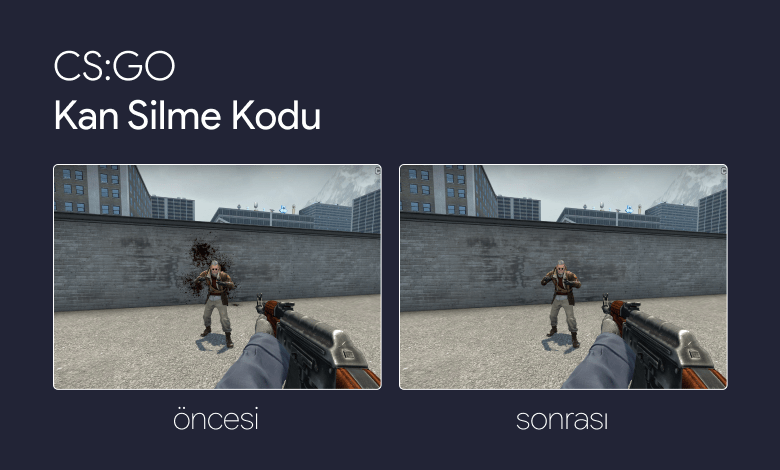
CS GO Wall Before and After Using the Clear Decals Command
How Do You Bind the CS GO Clear Decals Command to a Key?
- Start CS GO.
- Press the key assigned to open the console.
If you have not assigned a console key, press the "é" key below Esc. - Copy the r_cleardecals command below.
- Paste it into the console and press Enter.
- Every time you press Shift, the key's normal function will run and the decals on walls will be cleared.
Clear Blood While Walking With the Shift Key
Players often bind the command to Shift because the key is easy to reach and is commonly used to slow movement in CSGO. You can still bind the command to any key you prefer.
Combining the decal-removal command with "+speed" lets Shift keep its normal function while also clearing blood effects. For that reason, we recommend using the combined +speed and r_cleardecals bind.
bind shift "+speed; r_cleardecals"Alternative: Bind the Clear Decals Command to Caps Lock
Caps Lock can be a convenient option because it is positioned on the left side of most keyboards and is easy to reach. You can replace "capslock" in the command below with any key you prefer.
bind capslock "r_cleardecals"The CS GO clear decals command is a commonly used feature that can make the game view cleaner. It removes blood and bullet marks from walls and reduces visual clutter.
By using the bind command, players can assign the CSGO clear decals command to Shift, Caps Lock, or another key. The command can help maintain a cleaner field of view and a more consistent experience.
In conclusion, the CS GO clear decals command is a popular option for players who want fewer distracting marks and a clearer view during a match.
If you found this article useful, you may also want to read:


